Sending as another address, or on behalf of someone else
How to send from a shared address such as sales@, and how to let a colleague send from yours.
Zimbra separates two things that are easily confused. A persona lets you send from another of your own addresses. Delegation lets somebody else send from yours. Both are set up in Preferences, then Accounts, and delegation combines with folder sharing to give one person full use of another mailbox.
Personas: sending from another of your own addresses
A persona adds a second From address to your own account. Use it for an address such as sales@ or accounts@ that already reaches you. That might be an alias on your mailbox, or a distribution list you belong to.
- Open Preferences, then Accounts.
- Click Add Persona.
- Give the persona a name. This is what you pick from the From list when composing, so make it recognisable.
- Under Settings for Sent Messages, set the name and the address the recipient should see.
- Set a Reply-to address and its own signature if the persona needs them.
Zimbra can also choose the persona for you, by matching the address a message was sent to or the folder it arrived in. A reply to sales@ then goes out as sales@ without you selecting anything.
A persona changes the From address and nothing else. It grants no access to anybody else’s mailbox, so it is the wrong tool for covering a colleague’s mail.
Delegation: letting somebody send from your address
A delegate is another person allowed to send messages from your address. You add them on your own account, so the person who owns the address is the one who sets this up.
- Open Preferences, then Accounts, and select your primary account.
- Under Delegates, click Add Delegate.
- Enter the address of the person you are delegating to.
- Choose which of the two permissions below they get.
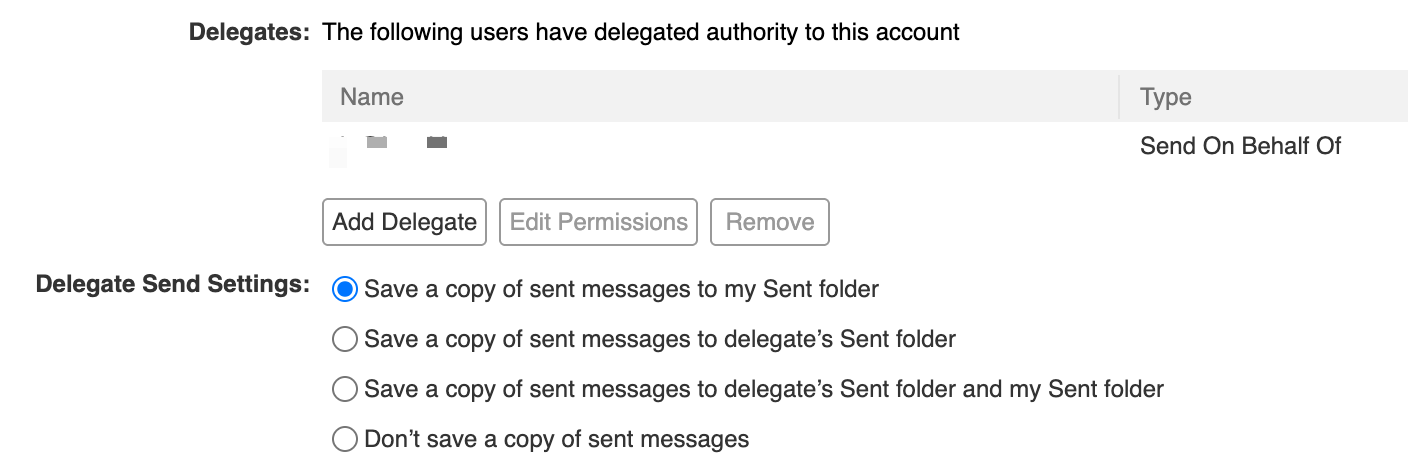
Send As, or Send on Behalf Of
Send As puts only your name and address in the From line. The recipient sees a message from you, with nothing to show who typed it.
Send on Behalf Of names both people, so the recipient sees the delegate’s name alongside yours. This is usually the right choice where somebody covers your mail, because it is honest about who wrote the message.
Where the sent copy is kept
Delegate Send Settings sits on the same page and decides which Sent folder keeps the copy: yours, the delegate’s, both, or neither. Saving to both is the safe answer, because each of you can then find what was sent without asking the other.
Full delegated access to a mailbox
Delegation covers sending only. To let somebody read and manage your mail as well, share the folders with them too.
Right-click the folder in the folder list and choose the sharing option, or open Preferences, then Sharing. Share the Inbox for mail, and the Calendar and Contacts folders as well if they need those.
The role you pick decides what they can do:
- Viewer reads, and nothing more.
- Manager reads, edits, files and deletes. This is what somebody covering your mail needs.
- Admin does all of that and can change the sharing itself.
The person receives an invitation and accepts it. The shared folder then appears in their own folder list, and they work in it alongside their own mail.
Add Delegate and folder sharing together give the arrangement most people mean by delegated access. Your colleague reads your inbox, replies from your address, and the replies are filed where you both expect to find them.
Sending from a mail program
Zimbra Connector for Outlook carries the same permissions. Personas appear in the From list, and you can type another address into the From field directly where you hold permission for it.
Other mail programs vary. Where one refuses to send from an address that is not its own account, use webmail for those messages.
If sending is refused
A message rejected with a permission error usually means the delegate was added to the wrong account. The delegate is added by the person who owns the address being sent from, not by the person doing the sending.
Zimbra’s classic web app guide covers both screens in more detail.