Sharing folders, calendars and contacts
What you can share, who you can share it with, and how much they are allowed to do.
Sharing is not limited to calendars and contacts. You can share any mail folder, calendar, address book or task list, including your Inbox. Trash and Junk are the only things you cannot share.
Set shares up in Zimbra webmail. The Zimbra Connector for Outlook supports sharing as well, but creating and accepting shares works more reliably through webmail.
Sharing something
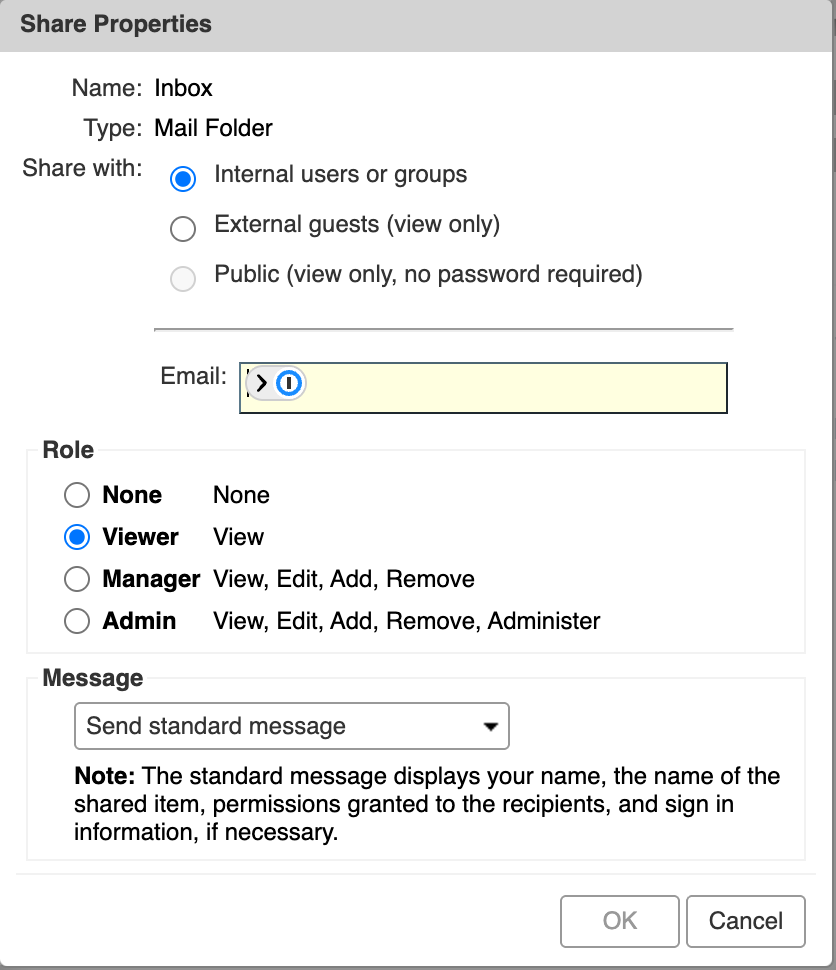
Right-click the folder, calendar, address book or task list in the list on the left and choose to share it. That opens the Share Properties window, where you choose who it goes to and what they can do.
Who you can share with
Internal users and groups are people on the same mail system as you, and they are the only ones who can be given permission to change anything.
External guests sign in with a password and can view but not edit. Public shares need no password at all, so treat that option as publishing rather than sharing.
What each role allows
Roles apply to internal users, and you can set them per person or per group.
| Role | Allows |
|---|---|
| Viewer | View the contents |
| Manager | View, edit, add and remove items |
| Admin | Everything a manager can do, and share it onward to other people |
Give Admin sparingly, because it lets someone else hand out access you did not grant.
What the other person sees
Shared content stays in your mailbox. The people you share with can read it, but nothing is copied into their account, so it does not use their storage and it disappears for them when you revoke the share.
You can change a role or withdraw access at any time from the same Share Properties window.