How to find your email headers
How to open the full headers of a message, which support may ask for when tracing a delivery problem.
The headers record every server a message passed through. They have to come from the message in your own mail program, because forwarding a message to someone else to read strips the original headers away.
Zimbra webmail
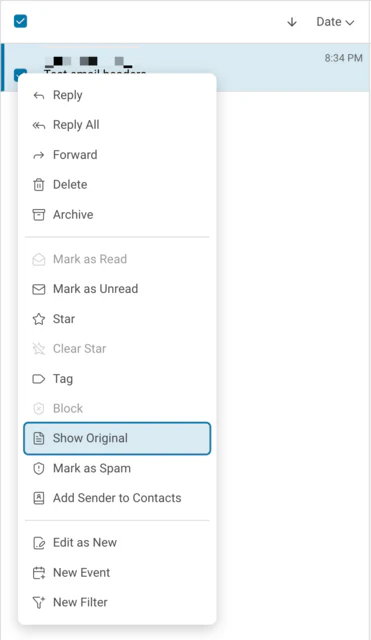
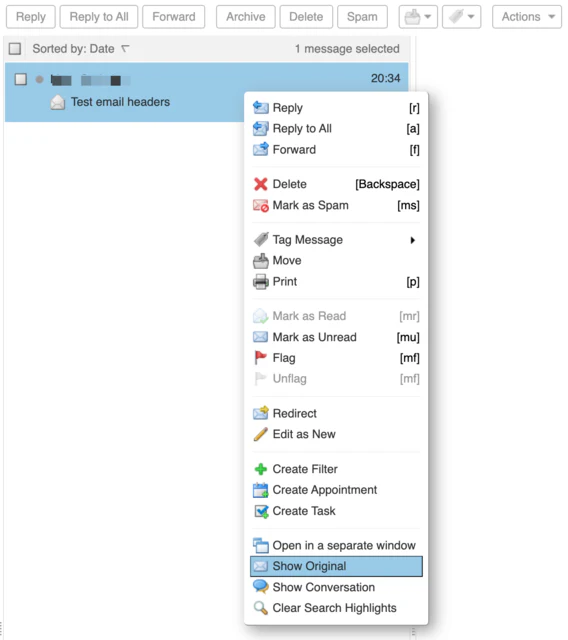
Right-click the message in the list and choose Show Original. The full message opens in a new tab, headers first. This works in both the modern and the classic web app, though the menu looks a little different in each.
In the modern web app:
In the classic web app:
Apple Mail
Select the message, then from the menu bar choose View, then Message, then All Headers. The headers appear above the message body. Raw Source in the same menu shows the entire message instead.
Outlook
Open the message in its own window by double-clicking it. Choose File, then Properties, and the headers are in the Internet headers box at the bottom.